
Quickly develop an Android page (user login & jump)
- Android UI and background logic
- Network requests
- Serialization and deserialization
- Save XML file (cookie)
Android UI and background logic #
android UI #
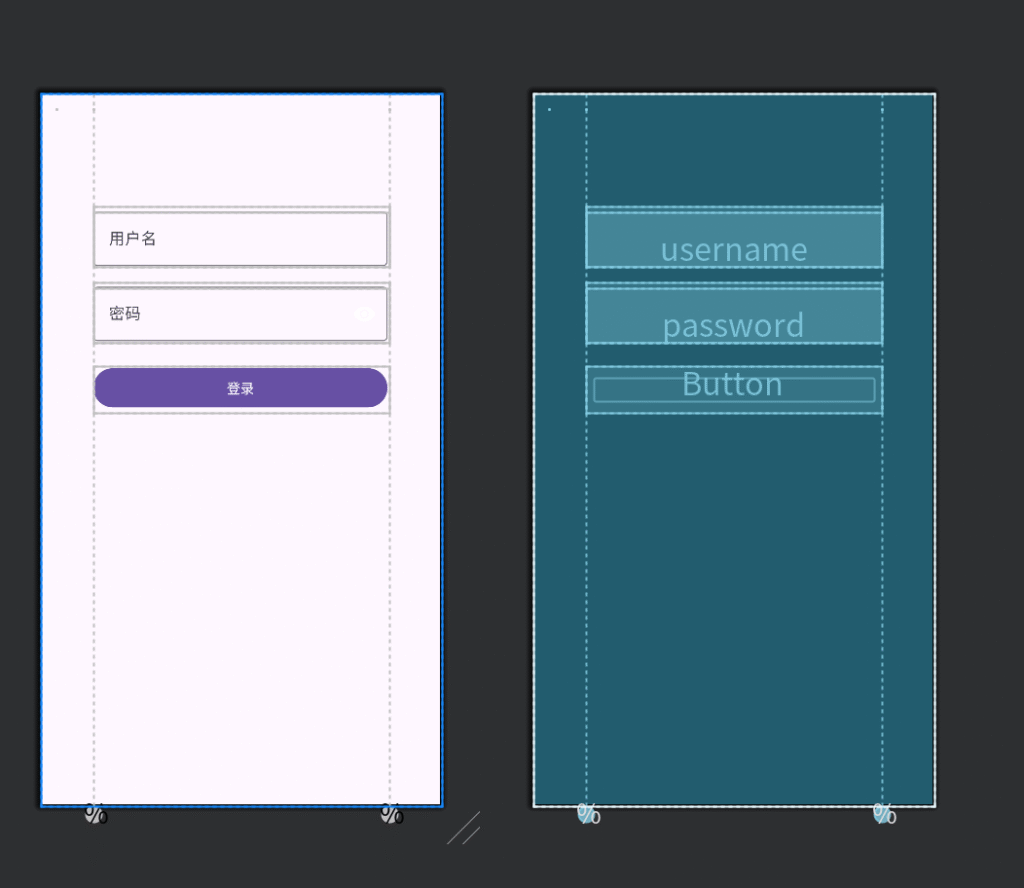
User Login Interface #
fragment_login.xml
<?xml version="1.0" encoding="utf-8"?>
<androidx.constraintlayout.widget.ConstraintLayout
xmlns:android="http://schemas.android.com/apk/res/android"
xmlns:app="http://schemas.android.com/apk/res-auto"
android:layout_width="match_parent"
android:layout_height="match_parent"
android:padding="16dp">

<!-- Left and right borders for centered layout -->
<androidx.constraintlayout.widget.Guideline
android:id="@+id/guideline_start"
android:layout_width="wrap_content"
android:layout_height="wrap_content"
android:orientation="vertical"
app:layout_constraintGuide_percent="0.1" /> <androidx.constraintlayout.widget.Guideline
android:id="@+id/guideline_end"
android:layout_width="wrap_content"
android:layout_height="wrap_content"
android:orientation="vertical"
app:layout_constraintGuide_percent="0.9" />

<!-- Username input box -->
<com.google.android.material.textfield.TextInputLayout
android:id="@+id/usernameTextInputLayout"
android:layout_width="0dp"
android:layout_height="wrap_content"
android:hint="username"
app:layout_constraintTop_toTopOf="parent"
app:layout_constraintStart_toStartOf="@id/guideline_start"
app:layout_constraintEnd_toEndOf="@id/guideline_end" android:layout_marginTop="100dp">

<com.google.android.material.textfield.TextInputEditText
android:id="@+id/username"
android:layout_width="match_parent"
android:layout_height="wrap_content"
android:inputType="textEmailAddress"/>
</com.google.android.material.textfield.TextInputLayout>

<!-- Password input box -->
<com.google.android.material.textfield.TextInputLayout
android:id="@+id/passwordTextInputLayout"
android:layout_width="0dp"
android:layout_height="wrap_content"
android:hint="password"
app:passwordToggleEnabled="true"
app:endIconMode="password_toggle" app:layout_constraintTop_toBottomOf="@id/usernameTextInputLayout"
app:layout_constraintStart_toStartOf="@id/guideline_start"
app:layout_constraintEnd_toEndOf="@id/guideline_end"
android:layout_marginTop="16dp">

<com.google.android.material.textfield.TextInputEditText
android:id="@+id/password"
android:layout_width="match_parent"
android:layout_height="wrap_content"
android:inputType="textPassword"/>
</com.google.android.material.textfield.TextInputLayout>

<!-- Login button -->
<Button
android:id="@+id/buttonLogin"
android:layout_width="0dp"
android:layout_height="wrap_content" android:text="Login"
app:layout_constraintTop_toBottomOf="@id/passwordTextInputLayout"
app:layout_constraintStart_toStartOf="@id/guideline_start"
app:layout_constraintEnd_toEndOf="@id/guideline_end"
android:layout_marginTop="24dp" />

<!-- Loading progress bar -->
<ProgressBar
android:id="@+id/loading"
android:layout_width="wrap_content"
android:layout_height="wrap_content"
android:visibility="gone"
app:layout_constraintTop_toBottomOf="@id/buttonLogin"
app:layout_constraintStart_toStartOf="parent"
app:layout_constraintEnd_toEndOf="parent"
android:layout_marginTop="16dp" </androidx.constraintlayout.widget.ConstraintLayout>
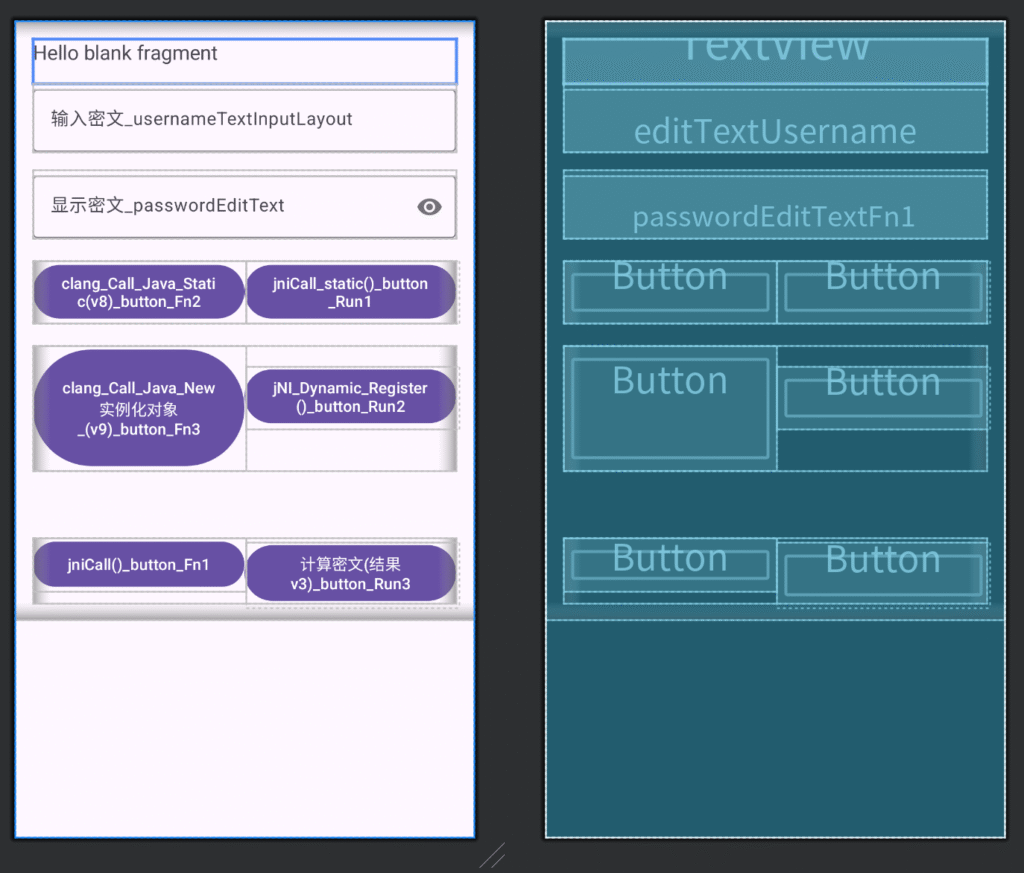
Function Interface #
fragment_fn1.xml
<?xml version="1.0" encoding="utf-8"?>
<ScrollView xmlns:android="http://schemas.android.com/apk/res/android"
    xmlns:tools="http://schemas.android.com/tools"
    xmlns:app="http://schemas.android.com/apk/res-auto"
    android:layout_width="match_parent"
    android:layout_height="match_parent"
    tools:context=".Fn1Fragment">

    <LinearLayout
        android:orientation="vertical"
        android:padding="16dp"
        android:layout_width="match_parent"
        android:layout_height="wrap_content">

        <TextView
            android:id="@+id/textView"
            android:layout_width="match_parent"
            android:layout_height="wrap_content"
            android:text="@string/hello_blank_fragment"
            android:textSize="18sp"
            android:paddingBottom="16dp" />

        <com.google.android.material.textfield.TextInputLayout
            android:id="@+id/usernameTextInputLayout"
            android:layout_width="match_parent"
            android:layout_height="wrap_content"
            android:hint="Enter_password_usernameTextInputLayout">

            <com.google.android.material.textfield.TextInputEditText
                android:id="@+id/editTextUsername"
                android:layout_width="match_parent"
                android:layout_height="wrap_content"
                android:inputType="textMultiLine"
                android:maxLines="5"
                android:minLines="1"
                android:scrollHorizontally="false"
                android:gravity="start|top"/>
        </com.google.android.material.textfield.TextInputLayout>

        <com.google.android.material.textfield.TextInputLayout
            android:id="@+id/passwordTextInputLayout"
            android:layout_width="match_parent"
            android:layout_height="wrap_content"
            android:layout_marginTop="16dp"
            android:hint="Display_password_text_passwordEditText"
            app:passwordToggleEnabled="true">

            <com.google.android.material.textfield.TextInputEditText
                android:id="@+id/passwordEditTextFn1"
                android:layout_width="match_parent"
                android:layout_height="wrap_content"
                android:inputType="textPassword|textMultiLine"
                android:maxLines="5"
                android:minLines="1"
                android:gravity="start|top"/>
        </com.google.android.material.textfield.TextInputLayout>

        <LinearLayout
            android:layout_width="match_parent"
            android:layout_height="wrap_content"
            android:orientation="horizontal"
            android:layout_marginTop="20dp">

            <Button
                android:id="@+id/buttonFn2"
                android:layout_width="0dp"
                android:layout_height="wrap_content"
                android:layout_weight="1"
                android:text="clang_Call_Java_Static(v8)_button_Fn2" />

            <Button
                android:id="@+id/buttonRun1"
                android:layout_width="0dp"
                android:layout_height="wrap_content"
                android:layout_weight="1"
                android:text="jniCall_static()_button_Run1" />
        </LinearLayout>

        <LinearLayout
            android:layout_width="match_parent"
            android:layout_height="wrap_content"
            android:orientation="horizontal"
            android:layout_marginTop="20dp">

            <Button
                android:id="@+id/buttonFn3"
                android:layout_width="0dp"
                android:layout_height="112dp"
                android:layout_weight="1"
                android:text="clang_Call_Java_NewInstantiated_Object_(v9)_button_Fn3" />

            <Button
                android:id="@+id/buttonRun2"
                android:layout_width="0dp"
                android:layout_height="wrap_content"
                android:layout_weight="1"
                android:text="jNI_Dynamic_Register()_button_Run2" />
        </LinearLayout>

        <LinearLayout
            android:layout_width="match_parent"
            android:layout_height="wrap_content"
            android:orientation="horizontal"
            android:layout_marginTop="60dp">
            <Button
                android:id="@+id/buttonFn1"
                android:layout_width="0dp"
                android:layout_height="wrap_content"
                android:layout_weight="1"
                android:text="jniCall()_button_Fn1" />
            <Button
                android:id="@+id/buttonRun3"
                android:layout_width="0dp"
                android:layout_height="wrap_content"
                android:layout_weight="1"
                android:text="Calculate_Ciphertext_(Result_v3)_button_Run3" />


        </LinearLayout>

    </LinearLayout>
</ScrollView>
Function Button Background Logic #
Fn1Fragment.java
package ca.netfilter; // Define package name as ca.netfilter
import android.os.Bundle; // Import Android Bundle class for data passing
import androidx.fragment.app.Fragment; // Import Fragment class for creating UI fragments
import android.text.InputType;
import android.util.Log;
import android.view.LayoutInflater; // Import layout inflater class
import android.view.View; // Import view class
import android.view.ViewGroup; // Import view container class
import android.widget.Button;


import android.widget.CompoundButton;
import android.widget.TextView;

import com.google.android.material.textfield.TextInputEditText;
import com.google.android.material.textfield.TextInputLayout;
import com.yoloho.libcore.util.Crypt;


/**
 * A simple {@link Fragment} subclass.
 * Use the {@link Fn1Fragment#newInstance} factory method to
 * create an instance of this fragment.
 *
 * A simple {@link Fragment} subclass.
 * Use the {@link Fn1Fragment#newInstance} factory method to
 * create an instance of this fragment.
 */

//public class Fn1Fragment extends androidx.fragment.app.Fragment {
//}
public class Fn1Fragment extends Fragment {   // Define a Fragment subclass named BlankFragment

    private static final String TAG = "Fn1Fragment"; // ✅ Add TAG

    static {
        System.loadLibrary("netfilter");
    }


    // TODO: Rename parameter arguments, choose names that match
    // the fragment initialization parameters, e.g. ARG_ITEM_NUMBER
    // TODO: Rename parameter names to match initialization parameters, e.g. ARG_ITEM_NUMBER


    // Variables are declared at the head and type.  you can use them Alone!
    public Button fn1Button,fn2Button,fn3Button,run1Button,run2Button,run3Button;
    public TextView txtUser,txtPwd;
    public TextInputEditText passwordEditText;
    public TextInputLayout passwordTextInputLayout;


    private static final String ARG_PARAM1 = "param1";   // Define key name for parameter 1
    private static final String ARG_PARAM2 = "param2";    // Define key name for parameter 2

    // TODO: Rename and change types of parameters  ---> Rename and change parameter types
    private String mParam1; // Used to save the value of param1
    private String mParam2;  // Used to save the value of param2

    public Fn1Fragment() {
        // Required empty public constructor  --> Required empty public constructor
    }

    /**
     * Use this factory method to create a new instance of  .--> Use this factory method to create a new instance of BlankFragment,
     * this fragment using the provided parameters. .--> and pass two parameters.
     *
     * @param param1 Parameter 1.--> param1 Parameter 1
     * @param param2 Parameter 2. -->param2 Parameter 2
     * @return A new instance of fragment BlankFragment.--> Return a new instance of BlankFragment
     */
    // TODO: Rename and change types and number of parameters -->Rename and modify parameter types and count
    public static Fn1Fragment newInstance(String param1, String param2) {
        Fn1Fragment fragment = new Fn1Fragment();// Create a new BlankFragment instance
        Bundle args = new Bundle(); // Create a new Bundle for passing parameters
        args.putString(ARG_PARAM1, param1);  // Put param1 into Bundle
        args.putString(ARG_PARAM2, param2); // Put param2 into Bundle
        fragment.setArguments(args);  // Set parameters to fragment
        return fragment; // Return the created fragment instance
    }

    @Override
    public void onCreate(Bundle savedInstanceState) {
        super.onCreate(savedInstanceState);  // Call parent class's onCreate method
        if (getArguments() != null) {  // If there are passed parameters
            mParam1 = getArguments().getString(ARG_PARAM1); // Get param1 and assign to mParam1
            mParam2 = getArguments().getString(ARG_PARAM2); // Get param2 and assign to mParam2
        }
    }

    @Override
    public View onCreateView(LayoutInflater inflater, ViewGroup container,
                             Bundle savedInstanceState) {
        // Inflate the layout for this fragment -->  Load layout file fragment_fn1.xml for this fragment
//        return inflater.inflate(R.layout.fragment_fn1, container, false);
        View rootView = inflater.inflate(R.layout.fragment_fn1, container, false);
        initView(rootView);  // Pass rootView
        initListener(); // ✅ Add click event binding
        return rootView;
    }


    public void initView(View rootView){
        // find the page useful tag
        // Set button binding events.
        txtUser = rootView.findViewById(R.id.editTextUsername);
        txtPwd = rootView.findViewById(R.id.passwordEditTextFn1);
        fn1Button = rootView.findViewById(R.id.buttonFn1);
        run1Button = rootView.findViewById(R.id.buttonRun1);
        fn2Button = rootView.findViewById(R.id.buttonFn2);
        run2Button = rootView.findViewById(R.id.buttonRun2);
        fn3Button = rootView.findViewById(R.id.buttonFn3);
        run3Button = rootView.findViewById(R.id.buttonRun3);
        passwordEditText = rootView.findViewById(R.id.passwordEditTextFn1);
        passwordTextInputLayout = rootView.findViewById(R.id.passwordTextInputLayout);

    }

    public void initListener(){
        run1Button.setOnClickListener(new View.OnClickListener() {  // First type: full form
            @Override
            public void onClick(View v){
                jniCall_static();
            }
        });
        fn2Button.setOnClickListener(v -> clang_Call_Java_v8());  // Second type: abbreviated form
        fn3Button.setOnClickListener(v -> clang_Call_Java_v9());
        run2Button.setOnClickListener(v -> jNI_Dynamic_Register());
        run3Button.setOnClickListener(v -> Call_Encrypted_Result());

    }


    public void Call_Encrypted_Result(){
        //Send network + connect queue, get task

//        String Plaintext = String.valueOf(txtUser.getText());
////        String Ciphertext = String.valueOf(txtPwd.getText());
//
//        //Call method and get corresponding result
//        String sign = Crypt.encrypt_data(0, Plaintext, 85);
//
//
//        passwordEditText.setText(sign);
//
//        // Send + write result
        String Plaintext = txtUser.getText().toString();
        String Ciphertext = txtPwd.getText().toString();

        // Call method and get corresponding result
        String sign = Crypt.encrypt_data(0, Plaintext, 85);

        // Display encryption result in passwordEditText
        passwordEditText.setText(sign);

    }

    public void jNI_Dynamic_Register(){
//        DynamicUtils utils = new DynamicUtils();
        int result = DynamicUtils.add(5, 7);
        System.out.println("jNI_Dynamic_Register ---> Result: " + result); // Output: Result: 12
//        String value = DynamicUtils.ssss(11,22);
//        Log.e("---->", value); //  rwxt

    }

    public void clang_Call_Java_v9(){
        String resultn9 = clangCallJavaNew.v9("October 2024",2024);
        System.out.println("Instance method---C calls Java---->Result: " + resultn9);


        // -----------------Call native method ------------- kanxue MissKing's ROM JNI tracing function test-----------
        // Create JniTraceMikrom instance and call lookForDemo method
        JniTraceMikrom jniTrace = new JniTraceMikrom();
        String result = jniTrace.lookForDemo();

        // Print return value of lookForDemo method
        Log.i(TAG, "Jni-Trace-Mikrom--case---->Result: " + result);

        // -----------------Call native method ------------- kanxue MissKing's ROM JNI tracing function test-----------------


        clangCallJavaNewExampleEncrypted resultv10 = EncryptUtils.v10("aid=123488384&page=199&size=100");
        if (resultv10 != null) {
            String resultv10_string = resultv10.toString();
            Log.e("---->", resultv10_string);
        } else {
            Log.e("---->", "Error: resultv10 is null.");
        }
    }
    public void clang_Call_Java_v8(){
        // Static method  (C calls Java)
        String resultn8 = clangCallJavaStatic.v8();
//        System.out.println(clangCallJavaStatic.v8());
        System.out.println("Static method---C calls Java---->Result: " + resultn8);
    }
    public void jniCall_static(){
        // 5.5 Character processing
//        String resultn5 = EncryptUtils.v5("name=wupeiqi&age=19");
        EncryptUtils.v5("name=wupeiqi&age=19");
//        System.out.println("5.5 Character processing--> Result: " + resultn5);
        // 5.6 Byte processing
//        String resultn6 = EncryptUtils.v6(   "name=wupeiqi&age=19".getBytes()    );
        EncryptUtils.v6(   "name=wupeiqi&age=19".getBytes()    );
//        System.out.println("5.6 Byte processing--> Result: " + resultn6);

        EncryptUtils.v7(   "name=wupeiqi&age=19".getBytes()    );
    }

    public void jniCall(){

        // JNI C (native variable already declared in Java's EncryptUtils class)
        // Call core algorithm, get signature value, send to backend API.
        String signString = EncryptUtils.v0(11, "alex");
        // More awesome algorithm, let it be implemented in C language.
        int sign1 = EncryptUtils.v1(2, 3);
        Log.e("Fn1--》Test Java calls C V1 function---->", String.valueOf(sign1)); //  133

        // Java calls JNI C language --V2 function
        String sign2 = EncryptUtils.v2("root");
        Log.e("Fn1--》Test calling Native V2 function----->",sign2);


        // Java calls JNI C language --V4 function
        // JNI CPP
//        TextView tv4 = findViewById(R.id.buttonRun1);
        String signV4 = EncryptUtils.v4("called","students");
        //tv.setText(EncryptUtils.v4("called","students"));
        fn1Button.setText(signV4);

        Log.e("Fn1--》Test calling Native V4 function----->",signV4);
    }

}
Definition of user login request #
/home/calleng/AndroidStudioProjects/NetFilter_PJ/app/src/main/java/ca/netfilter/ui/login/LoginFragment.java
private void doLogin() {
        String username = binding.username.getText().toString();
        String password = binding.password.getText().toString();

        TreeMap<String, String> map = new TreeMap<>();
        map.put("user", username);
        map.put("pwd", password);

        StringBuilder sb = new StringBuilder();
        for (Map.Entry<String, String> entry : map.entrySet()) {
            sb.append(entry.getKey()).append("=").append(entry.getValue()).append("&");
        }
        sb.deleteCharAt(sb.length() - 1); // Remove the final '&'

        String signString = md5(sb.toString());
        map.put("sign", signString);

        new Thread(() -> {
            try {
                Retrofit retrofit = new Retrofit.Builder()
                        .baseUrl("http://192.168.9.101:8081")
                        .build();
                HttpReq req = retrofit.create(HttpReq.class);   // Create a Retrofit interface
                // Send using form format
                // Call<ResponseBody> call = req.postLogin("xianning","password_good");
                // Send using form format

                // Send using JSON format

                JSONObject json = new JSONObject(map);
                String jsonString = json.toString();

                RequestBody form = RequestBody.create(
                        MediaType.parse("application/json;charset=utf-8"),
                        jsonString);
                Call<ResponseBody> call = req.postLoginJson(form); // Call method name, method name needs to pass parameters
                // Send using JSON format

                //  ResponseBody responseBody =  req.postLoginJson( RequestBody.create(MediaType.parse("application/json;charset=utf-8"),jsonString)).execute().body()
                ResponseBody responseBody = call.execute().body();// Execute method,
                if (responseBody == null) {
                    Log.e("Login", "Response body is null");
                    return;
                }

                String responseString = responseBody.string();//   Get return value after execution
                // The continuous operation is , req.postLoginJson( RequestBody.create(MediaType.parse("application/json;charset=utf-8"),jsonString)).execute().body().string()

                // {"code":200,"msg":"ok","token":"jfieefjeifjei-jefjeifejf-ejfiefi-100"}
                HttpResponse obj = new Gson().fromJson(responseString, HttpResponse.class);

                //Log.e("Retrofit return result",responseString);
                Log.e("Retrofit return result", obj.token);// Output Gson deserialization

                // Get server credentials, write to local xml file
                // Write to SharedPreferences
                Context context = getContext();
                if (context != null) {
                    SharedPreferences sp = context.getSharedPreferences("s_city", Context.MODE_PRIVATE);
                    SharedPreferences.Editor editor = sp.edit();
                    editor.putString("token", obj.token);
                    editor.apply();

                    // Read token value from local xml file
                    String token = sp.getString("token", "");
                    Log.e("Read token value from local xml file", token);
                }

            } catch (Exception e) {
                e.printStackTrace();
            }
        }).start();
    }
user login request api #
/home/calleng/p9/Mikrom2.0/ToolKit/杂七杂八工具箱/Android_Http_API.py
from flask import Flask, jsonify, request

app = Flask(__name__)


@app.route('/auth',methods=["GET","POST"])
def auth():

    """
    # 1,Get data (Form format)
    username = request.form.get("user")
    password = request.form.get("pwd")
    sign = request.form.get('sign')
    print(username,password,sign)
    """
    # 1,Get data
    print(request.data)  # Get raw format
    # print(request.json)
    print(request.form)
    print(request.headers)


    # 2,Verify signature validity

    # 3,Business processing
    return jsonify({"code":200,"msg":"ok","token":"jfieefjeifjei-jefjeifejf-ejfiefi-100"})

@app.route('/users',methods=["GET","POST"])
def users():
    # print(request.data)  # Get raw format
    print(request.json)
    print(request.form)
    print(request.headers)

    return jsonify({"code":200,"msg":"ok","token":"jfieefjeifjei-jefjeifejf-ejfiefi-100"})


if __name__ == '__main__':
    # app.run(host='127.0.0.1', port=8080)
    # app.run(host='10.10.10.236', port=8080)
    app.run(host='0.0.0.0', port=8081)
Network Request Flow #
Step 1: Request Method #
Java
private void doLogin() {
    String username = binding.username.getText().toString();
    String password = binding.password.getText().toString();

    // 1. Construct request data
    TreeMap<String, String> map = new TreeMap<>();
    map.put("user", username);
    map.put("pwd", password);

    // 2. Generate MD5 signature
    String signString = md5("pwd=" + password + "&user=" + username);
    map.put("sign", signString);

    // 3. Async network request
    new Thread(() -> {
        try {
            // Use Retrofit to send request
            Retrofit retrofit = new Retrofit.Builder()
                    .baseUrl("http://192.168.9.101:8081")
                    .build();

            HttpReq req = retrofit.create(HttpReq.class);

            // Convert to JSON format
            JSONObject json = new JSONObject(map);
            String jsonString = json.toString();

            // Create request body
            RequestBody form = RequestBody.create(
                    MediaType.parse("application/json;charset=utf-8"),
                    jsonString);

            // Send request
            Call<ResponseBody> call = req.postLoginJson(form);
            ResponseBody responseBody = call.execute().body();

            if (responseBody != null) {
                String responseString = responseBody.string();
                // Handle response data...
            }

        } catch (Exception e) {
            e.printStackTrace();
        }
    }).start();
}Step2:Form Format Comparison –> Form Format (application/x-www-form-urlencoded) #
Java
// Construct Form data
FormBody.Builder formBuilder = new FormBody.Builder()
    .add("user", "calleng")
    .add("pwd", "2022")
    .add("sign", "5f4dcc3b5aa765d61d8327deb882cf99");

RequestBody formBody = formBuilder.build();
HTTP Request Example:
POST /auth HTTP/1.1
Host: 192.168.9.101:8081
Content-Type: application/x-www-form-urlencoded
Content-Length: 58

pwd=2022&user=calleng&sign=5f4dcc3b5aa765d61d8327deb882cf99
JSON Format (application/json) – Currently Used
Java
// Construct JSON data
TreeMap<String, String> map = new TreeMap<>();
map.put("user", "calleng");
map.put("pwd", "2022");
map.put("sign", "5f4dcc3b5aa765d61d8327deb882cf99");

JSONObject json = new JSONObject(map);
String jsonString = json.toString();

RequestBody jsonBody = RequestBody.create(
    MediaType.parse("application/json;charset=utf-8"),
    jsonString
);
HTTP Request Example:
POST /auth HTTP/1.1
Host: 192.168.9.101:8081
Content-Type: application/json;charset=utf-8
Content-Length: 78

{
  "pwd": "2022",
  "user": "calleng",
  "sign": "5f4dcc3b5aa765d61d8327deb882cf99"
}
Step 3: Retrofit Configuration Code . Retrofit Interface Definition #
HttpReq.java
import okhttp3.RequestBody;
import okhttp3.ResponseBody;
import retrofit2.Call;
import retrofit2.http.Body;
import retrofit2.http.POST;
import retrofit2.http.GET;

public interface HttpReq {

    // JSON format POST request
    @POST("/auth")
    Call<ResponseBody> postLoginJson(@Body RequestBody body);

    // Form format POST request (optional)
    @POST("/auth")
    @FormUrlEncoded
    Call<ResponseBody> postLoginForm(
        @Field("user") String user,
        @Field("pwd") String pwd,
        @Field("sign") String sign
    );

    // GET request to get user info
    @GET("/users")
    Call<ResponseBody> getUserInfo();
}
Retrofit Client Configuration
import retrofit2.Retrofit;
import retrofit2.converter.gson.GsonConverterFactory;

public class RetrofitClient {

    private static Retrofit retrofit = null;

    // Basic configuration
    public static Retrofit getBasicClient() {
        if (retrofit == null) {
            retrofit = new Retrofit.Builder()
                    .baseUrl("http://192.168.9.101:8081")
                    .build();
        }
        return retrofit;
    }

    // Configuration with Gson converter
    public static Retrofit getGsonClient() {
        if (retrofit == null) {
            retrofit = new Retrofit.Builder()
                    .baseUrl("http://192.168.9.101:8081")
                    .addConverterFactory(GsonConverterFactory.create())
                    .build();
        }
        return retrofit;
    }

    // Configuration with OkHttp client
    public static Retrofit getFullClient(OkHttpClient client) {
        if (retrofit == null) {
            retrofit = new Retrofit.Builder()
                    .baseUrl("http://192.168.9.101:8081")
                    .client(client)
                    .addConverterFactory(GsonConverterFactory.create())
                    .build();
        }
        return retrofit;
    }
}
Step 4: Request Interceptor #
Logging Interceptor Implementation
import okhttp3.logging.HttpLoggingInterceptor;

public class LoggingInterceptor {
    public static HttpLoggingInterceptor getInterceptor() {
        HttpLoggingInterceptor logging = new HttpLoggingInterceptor();
        logging.setLevel(HttpLoggingInterceptor.Level.BODY); // Log complete request and response info
        return logging;
    }
}
Header Interceptor
import okhttp3.Interceptor;
import okhttp3.Request;
import okhttp3.Response;

public class HeaderInterceptor implements Interceptor {
    @Override
    public Response intercept(Chain chain) throws IOException {
        Request originalRequest = chain.request();

        Request requestWithHeaders = originalRequest.newBuilder()
                .addHeader("User-Agent", "Android-NetFilter/1.0")
                .addHeader("Accept", "application/json")
                .addHeader("Content-Type", "application/json;charset=utf-8")
                .addHeader("X-App-Version", "1.0.0")
                .build();

        return chain.proceed(requestWithHeaders);
    }
}
Authentication Interceptor
import android.content.Context;
import android.content.SharedPreferences;

public class AuthInterceptor implements Interceptor {
    private Context context;

    public AuthInterceptor(Context context) {
        this.context = context;
    }

    @Override
    public Response intercept(Chain chain) throws IOException {
        Request originalRequest = chain.request();

        // Read Token from SharedPreferences
        SharedPreferences sp = context.getSharedPreferences("s_city", Context.MODE_PRIVATE);
        String token = sp.getString("token", "");

        if (!token.isEmpty()) {
            Request requestWithAuth = originalRequest.newBuilder()
                    .addHeader("Authorization", "Bearer " + token)
                    .build();
            return chain.proceed(requestWithAuth);
        }

        return chain.proceed(originalRequest);
    }
}
Complete OkHttp Client Configuration
import okhttp3.OkHttpClient;
import java.util.concurrent.TimeUnit;

public class OkHttpClientFactory {

    public static OkHttpClient createClient(Context context) {
        return new OkHttpClient.Builder()
                // Add interceptors
                .addInterceptor(new HeaderInterceptor())
                .addInterceptor(new AuthInterceptor(context))
                .addInterceptor(LoggingInterceptor.getInterceptor())

                // Set timeout
                .connectTimeout(30, TimeUnit.SECONDS)
                .readTimeout(30, TimeUnit.SECONDS)
                .writeTimeout(30, TimeUnit.SECONDS)

                // Retry mechanism
                .retryOnConnectionFailure(true)

                .build();
    }
}
Step 5: Gson Deserialization Parsing #
Data Model Class Definition
// Response data model
public class HttpResponse {
    public int code;
    public String msg;
    public String token;
    public User data; // Optional user data

    @Override
    public String toString() {
        return "HttpResponse{" +
                "code=" + code +
                ", msg='" + msg + '\'' +
                ", token='" + token + '\'' +
                '}';
    }
}

// User data model (optional)
public class User {
    public String id;
    public String username;
    public String email;
    public long createTime;
}
Gson Parsing Code
import com.google.gson.Gson;
import com.google.gson.reflect.TypeToken;

public class GsonParser {

    // 1. Basic object parsing
    public static HttpResponse parseResponse(String jsonString) {
        Gson gson = new Gson();
        HttpResponse response = gson.fromJson(jsonString, HttpResponse.class);
        return response;
    }

    // 2. Parsing with generics
    public static List<User> parseUserList(String jsonString) {
        Gson gson = new Gson();
        Type type = new TypeToken<List<User>>(){}.getType();
        return gson.fromJson(jsonString, type);
    }

    // 3. Manual parsing (more flexible)
    public static void manualParse(String jsonString) {
        try {
            JSONObject jsonObject = new JSONObject(jsonString);

            int code = jsonObject.getInt("code");
            String msg = jsonObject.getString("msg");
            String token = jsonObject.optString("token", ""); // optString avoids exceptions

            if (code == 200) {
                Log.i("GsonParse", "Login successful: " + token);
            } else {
                Log.e("GsonParse", "Login failed: " + msg);
            }

        } catch (Exception e) {
            Log.e("GsonParse", "Parsing failed: " + e.getMessage());
        }
    }
}
Using Gson in Network Requests
private void doLoginWithGson() {
    // ... previous network request code

    // After receiving response
    String responseString = responseBody.string();

    // Method 1: Direct parsing
    HttpResponse response = GsonParser.parseResponse(responseString);
    Log.e("GsonParsingResult", "Token: " + response.token);

    // Method 2: Manual parsing
    GsonParser.manualParse(responseString);

    // Method 3: Use Gson instance
    Gson gson = new Gson();
    HttpResponse obj = gson.fromJson(responseString, HttpResponse.class);
    Log.e("DirectGsonParsing", obj.token);
}
Step 6: XML File Save Code #
SharedPreferences Storage (actually XML format)
import android.content.Context;
import android.content.SharedPreferences;

public class PreferenceManager {
    private Context context;
    private SharedPreferences sharedPreferences;

    public PreferenceManager(Context context) {
        this.context = context;
        this.sharedPreferences = context.getSharedPreferences("s_city", Context.MODE_PRIVATE);
    }

    // Save Token
    public void saveToken(String token) {
        SharedPreferences.Editor editor = sharedPreferences.edit();
        editor.putString("token", token);
        editor.putString("login_time", String.valueOf(System.currentTimeMillis()));
        editor.apply(); // Async save

        Log.i("SharedPreferences", "Token saved: " + token);
    }

    // Read Token
    public String getToken() {
        return sharedPreferences.getString("token", "");
    }

    // Save user info
    public void saveUserInfo(String username, String userId) {
        SharedPreferences.Editor editor = sharedPreferences.edit();
        editor.putString("username", username);
        editor.putString("user_id", userId);
        editor.putBoolean("is_logged_in", true);
        editor.apply();
    }

    // Clear all data
    public void clearAllData() {
        SharedPreferences.Editor editor = sharedPreferences.edit();
        editor.clear();
        editor.apply();
        Log.i("SharedPreferences", "All data cleared");
    }
}
Real XML File Operations
import java.io.File;
import java.io.FileOutputStream;
import java.io.FileInputStream;
import java.io.IOException;
import org.w3c.dom.Document;
import org.w3c.dom.Element;
import javax.xml.parsers.DocumentBuilder;
import javax.xml.parsers.DocumentBuilderFactory;
import javax.xml.transform.Transformer;
import javax.xml.transform.TransformerFactory;
import javax.xml.transform.dom.DOMSource;
import javax.xml.transform.stream.StreamResult;

public class XmlManager {
    private Context context;
    private String xmlFileName = "login_data.xml";

    public XmlManager(Context context) {
        this.context = context;
    }

    // Save data to XML file
    public void saveToXml(String token, String username, String userId) {
        try {
            // Get file path
            File xmlFile = new File(context.getFilesDir(), xmlFileName);

            // Create Document
            DocumentBuilderFactory docFactory = DocumentBuilderFactory.newInstance();
            DocumentBuilder docBuilder = docFactory.newDocumentBuilder();
            Document doc = docBuilder.newDocument();

            // Create root element
            Element rootElement = doc.createElement("LoginData");
            doc.appendChild(rootElement);

            // Create user info element
            Element userElement = doc.createElement("User");
            rootElement.appendChild(userElement);

            // Add child elements
            createElement(doc, userElement, "Token", token);
            createElement(doc, userElement, "Username", username);
            createElement(doc, userElement, "UserId", userId);
            createElement(doc, userElement, "LoginTime", String.valueOf(System.currentTimeMillis()));

            // Save to file
            TransformerFactory transformerFactory = TransformerFactory.newInstance();
            Transformer transformer = transformerFactory.newTransformer();
            DOMSource source = new DOMSource(doc);
            StreamResult result = new StreamResult(xmlFile);

            transformer.transform(source, result);

            Log.i("XMLFile", "Data saved successfully: " + xmlFile.getAbsolutePath());

        } catch (Exception e) {
            Log.e("XMLFile", "Save failed: " + e.getMessage());
        }
    }

    // Helper method to create elements
    private void createElement(Document doc, Element parent, String tagName, String textContent) {
        Element element = doc.createElement(tagName);
        element.setTextContent(textContent);
        parent.appendChild(element);
    }

    // Read XML file
    public void readFromXml() {
        try {
            File xmlFile = new File(context.getFilesDir(), xmlFileName);

            if (!xmlFile.exists()) {
                Log.w("XMLFile", "File does not exist");
                return;
            }

            DocumentBuilderFactory docFactory = DocumentBuilderFactory.newInstance();
            DocumentBuilder docBuilder = docFactory.newDocumentBuilder();
            Document doc = docBuilder.parse(xmlFile);

            Element root = doc.getDocumentElement();
            Element userElement = (Element) root.getElementsByTagName("User").item(0);

            String token = getElementText(userElement, "Token");
            String username = getElementText(userElement, "Username");
            String loginTime = getElementText(userElement, "LoginTime");

            Log.i("XMLRead", "Token: " + token);
            Log.i("XMLRead", "Username: " + username);
            Log.i("XMLRead", "LoginTime: " + loginTime);

        } catch (Exception e) {
            Log.e("XMLFile", "Read failed: " + e.getMessage());
        }
    }

    // Helper method to get element text
    private String getElementText(Element parent, String tagName) {
        Element element = (Element) parent.getElementsByTagName(tagName).item(0);
        return element != null ? element.getTextContent() : "";
    }
}
Using Storage in Network Requests
private void handleLoginResponse(HttpResponse response) {
    if (response.code == 200) {
        // 1. Use SharedPreferences to save
        PreferenceManager preferenceManager = new PreferenceManager(getContext());
        preferenceManager.saveToken(response.token);
        preferenceManager.saveUserInfo("calleng", "12345");

        // 2. Use XML file to save
        XmlManager xmlManager = new XmlManager(getContext());
        xmlManager.saveToXml(response.token, "calleng", "12345");

        // 3. Read and verify
        String savedToken = preferenceManager.getToken();
        Log.i("StorageVerification", "Saved Token: " + savedToken);

        xmlManager.readFromXml(); // Read XML file content

    } else {
        Log.e("LoginFailed", response.msg);
    }
}
Summary #
Data Flow: #
User Input
→ Construct Form
→ MD5 Signature
→ JSON Serialization
→ Retrofit Send
→ Interceptor Process
→ Server Response
→ Gson Parse
→ XML Save
dipper:/data/data/ca.netfilter/shared_prefs # cat s_city.xml
dipper:/data/data/ca.netfilter # cd shared_prefs/
dipper:/data/data/ca.netfilter/shared_prefs # ls
s_city.xml
dipper:/data/data/ca.netfilter/shared_prefs # cat s_city.xml
<?xml version='1.0' encoding='utf-8' standalone='yes' ?>
<map>
    <string name="token">jfieefjeifjei-jefjeifejf-ejfiefi-100</string>
</map>
dipper:/data/data/ca.netfilter/shared_prefs #
Key Components: #
- Retrofit2 – Network request framework
- OkHttp – HTTP client + interceptors
- Gson – JSON serialization/deserialization
- SharedPreferences – Lightweight XML storage
- DOM Parser – Standard XML file operations